 SGT Apps
What you need first
A company prefix licensed to you by GS1. You pay GS1 for it, not us. A shorter prefix leaves room for more codes. Selling only in your own shop? You can use GS1's in-store numbers instead: start with 2 for EAN or 4 for UPC, and never use those on products sold through other retailers or marketplaces.
Using Shopify? SGT is our app for this: see it on the Shopify App Store (free plan, 4.8 from 53 reviews).
The formats SGT makes
| Format | Digits | Used for |
|---|---|---|
| UPC-A | 12 | Retail, mainly the US and Canada |
| EAN-13 | 13 | Retail, most other countries |
| EAN-8 | 8 | Very small packs |
| ITF-14 | 14 | Cartons and cases |
On labels SGT can also print UPC-E, Code 128 and Code 39. See which barcode to use for each job.
Generate them in SGT
- Open Manual Generation. Under Apply To choose Barcode.
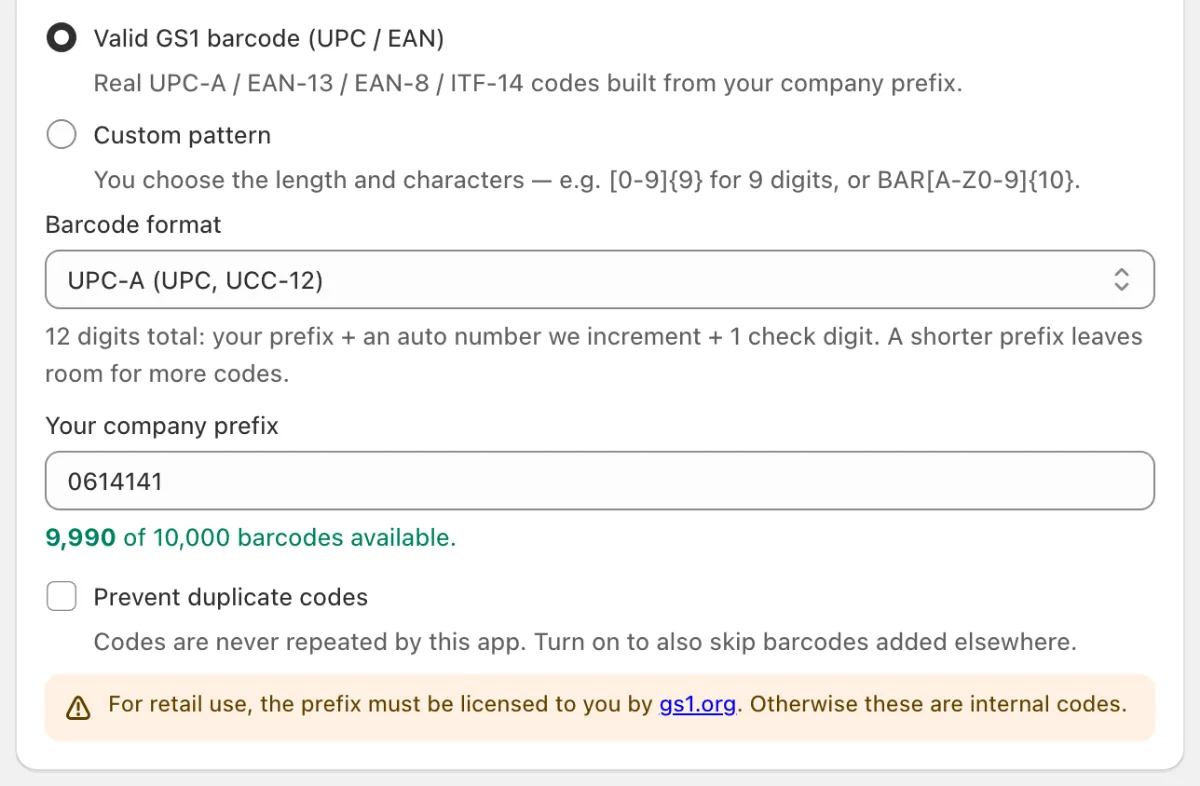
- Choose Valid GS1 barcode (UPC / EAN), then your Barcode format.
- Enter Your company prefix. SGT shows how many barcodes are available.
- Tick the variants, check each new barcode in the list, and click Generate.
Never repeat a number
SGT doesn't repeat its own numbers. To also skip numbers added elsewhere, such as by hand or another app, tick Prevent duplicate codes (paid plan). See how to prevent duplicates. If your prefix runs out, SGT tells you how many are left before it starts.
New products too
Turn on Auto Generate and new products and variants get the next number by themselves. It shares your prefix and counter with Manual Generation, so the two never clash.
Check a number by hand
Our check digit calculator checks any UPC, EAN or GTIN, or works out its last digit. A correct check digit only shows the number is well formed. It doesn't license a GS1 prefix or register the product with GS1.
Shopify's GTIN suggestion
SGT saves barcodes with Shopify's Custom type, so Shopify may suggest GTIN as the type for a valid number. If the number comes from your own GS1 prefix, accept it on the variant or all at once in the bulk editor. It's optional. See how to accept the suggestions.
Shipping to EU customers from outside the EU? See Shopify EU product identifiers.
Prefer video? Watch the 90-second SGT tour on YouTube.
Frequently asked questions
Can I generate UPC codes in Shopify without buying a GS1 prefix?
You can generate numbers for your own shop using GS1's in-store ranges, or use internal codes. Numbers sold through retailers and marketplaces should come from a prefix licensed to you by GS1.
Does SGT sell barcodes or GS1 prefixes?
No. SGT builds barcodes from the prefix you already have. Prefixes are licensed by GS1.
How many barcodes can I make from my GS1 prefix?
It depends on the prefix and the format. SGT shows the exact number left as soon as you enter your prefix. A shorter prefix leaves more room.
Is GS1 barcode generation on the free plan?
Yes. All four formats are on every plan, with the free plan's 100 codes a month. Checking your whole store for numbers already in use needs a paid plan.