 SGT Apps
Chapters and the full transcript: Shopify EU product identifiers (video).
The short answer
Since 1 November 2026, each item in a parcel worth €150 or less, sent from outside the EU to an EU customer, needs product identifiers on the customs declaration. Shopify says a parcel without them can be held or rejected at customs, and you might be charged return-to-origin fees.
Using Shopify? SGT is our app for this: see it on the Shopify App Store (free plan, 4.8 from 53 reviews).
That doesn't mean every product needs a barcode from GS1. A product with no GTIN, EAN, UPC or ISBN can be declared as having none.
What the three identifiers mean in Shopify
| Identifier | What it is | Where Shopify gets it |
|---|---|---|
| M-PID (merchant) | Your own identifier for the item | The variant's ID. You add nothing. |
| S-PID (standardized) | A GTIN, EAN, UPC or ISBN issued under an international standard | The variant's barcode with the matching type. A Custom barcode also counts if it's a valid GTIN of 8, 12, 13 or 14 digits. |
| NS-PID (manufacturer) | The maker's model number, part number or style code | A barcode with the NS-PID type. With none, Shopify falls back to a standardized barcode, any other barcode, the SKU, then the variant ID. |
So a variant with a GTIN or a SKU already meets the NS-PID requirement in Shopify. The S-PID is the one that needs a decision: add a real one, or declare that there isn't one. Your own code doesn't fill the S-PID, and neither does typing a placeholder such as "None".
Do you need a GTIN?
- The product has a manufacturer's GTIN, EAN, UPC or ISBN: add it to the variant and choose the matching type.
- The product has none, such as your own unbranded goods: turn on the declaration below. Customs calls it Y081.
- A retailer or marketplace asks for a GTIN: that's a separate requirement. See Do I need UPC codes for Shopify?
What to do for each variant
| The variant has | What Shopify uses | What to do |
|---|---|---|
| One real GS1 barcode, any type | It as the S-PID, and as the NS-PID too if there's no NS-PID barcode | Nothing is missing. Setting its type to GTIN, UPC, EAN or ISBN is safer. Don't turn on the declaration. |
| One barcode that's your SKU or an internal code, not a valid GTIN | It as the NS-PID. There's no S-PID. | Turn on the declaration. Changing its type to NS-PID doesn't record the declaration. |
| A SKU and no barcode | The SKU as the NS-PID. There's no S-PID. | Add the real barcode if one exists. If not, turn on the declaration. There's no need to add the SKU as a barcode. |
| No barcode and no SKU | The variant's ID as the NS-PID. There's no S-PID. | Same as above. Giving it a SKU is still a good idea. |
| A real GS1 barcode and a maker's code | The barcode as the S-PID and the NS-PID barcode as the NS-PID | Nothing is missing. Keep just one NS-PID barcode. |
GS1 barcodes you added yourself, with or without an app
You don't need an app for this. Shopify's own rules are:
- One barcode is enough. A real GS1 barcode covers the S-PID, and Shopify also uses it as the NS-PID if there's no NS-PID barcode.
- A new barcode you type in: if it's registered with GS1, Shopify sets its type to GTIN by itself.
- A barcode already saved as Custom: if it's a valid GTIN, Shopify suggests GTIN as the type. Nothing changes unless you accept. In the bulk editor you can accept or dismiss all the suggestions at once.
- If you ignore the suggestion: Shopify staff say a Custom barcode holding a valid GTIN, meaning the correct format and check digit, is already used as the S-PID. They call setting the proper type "the safer move".
How to accept the suggestions in the bulk editor
- Tick your products, click Bulk edit, and add the Barcodes column from Columns if it isn't showing.
- A suggested barcode shows GTIN with a sparkle icon. Click its tick to accept it or its cross to dismiss it, or use Set barcodes as GTIN or Dismiss GTIN suggestions at the top for all of them.
- Click Save.
To choose a different type, click the barcode and open its type menu: Custom, GTIN, UPC, EAN, ISBN, ASIN or NS-PID.
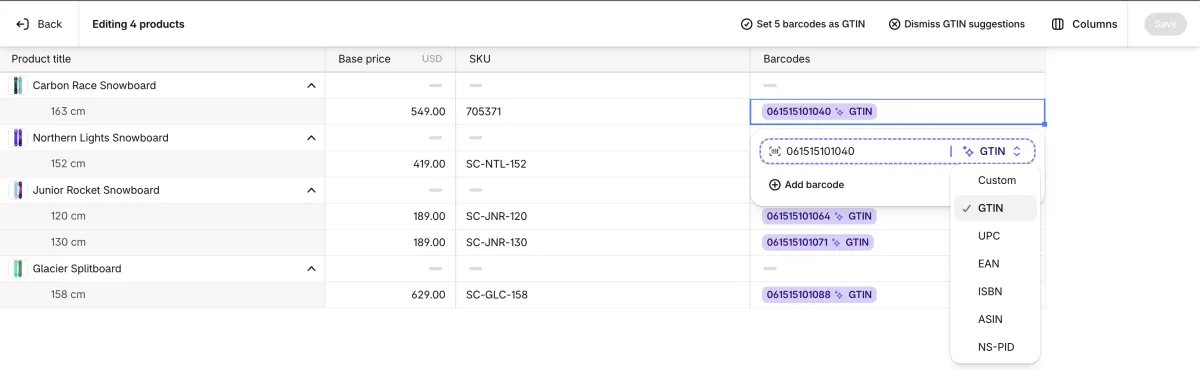
A suggestion isn't proof. It means the number looks like a valid GTIN. It doesn't show that GS1 issued the number to you, so only accept it for numbers from your own GS1 prefix or the manufacturer.
Check your internal barcodes
This is easy to miss. Shopify's check is about the format and check digit, so an internal number can pass even though nobody issued it as a GTIN, for example a GS1 in-store number starting with 2 for EAN or 4 for UPC, or a number made by a barcode app.
If your barcodes are internal codes, the product has no standardized identifier, so dismiss any GTIN suggestion and turn on the declaration. Once it's on, Shopify sends no standardized identifier for that item, even if a barcode is saved, and your internal barcode keeps working for scanning in your own store.
The other way round matters too: don't turn the declaration on for a product with a real barcode, because Shopify then won't send it.
Add identifiers in Shopify
- In Shopify admin, go to Products and click the product. If it has variants, click the variant.
- In the Barcodes section, enter the GTIN, EAN, UPC or ISBN and select the matching type.
- Optional: enter the manufacturer's model, part or style code as another barcode and select the NS-PID type.
- Click Save.
For many products, use the bulk editor or a CSV import. In a CSV, the Barcodes column takes a type before a colon, with a semicolon between barcodes, such as gtin:00012345678905; INTERNAL-123. A barcode with no type comes in as Custom. See how to import SKUs and barcodes.
Shopify says its channels still read the first barcode on a variant, so keep your real GS1 barcode first, and check any outside feed you use. For customs, Shopify staff say there's no fixed rule for which barcode is used when there are several of a kind, so don't rely on the order. Keep one NS-PID barcode per variant.
Declare that a product has no standardized identifier
- Open the product, or the variant if it has variants.
- In the Shipping section, check Physical product is on, then click More details.
- Tick No EU standardized identifier, just under the HS code. Shopify's help page calls it Has no standardized identifier, so the name can differ in your admin.
- Click Save.
Only use this when the product truly has no GTIN, EAN, UPC or ISBN. The country of origin and HS code are in the same place, so it's a good moment to check them too.
Declare many products at once
- Tick your products and click Bulk edit.
- Click Columns and add No standardized identifier.
- Tick the box on each variant that has no GTIN, EAN, UPC or ISBN.
- Click Save.
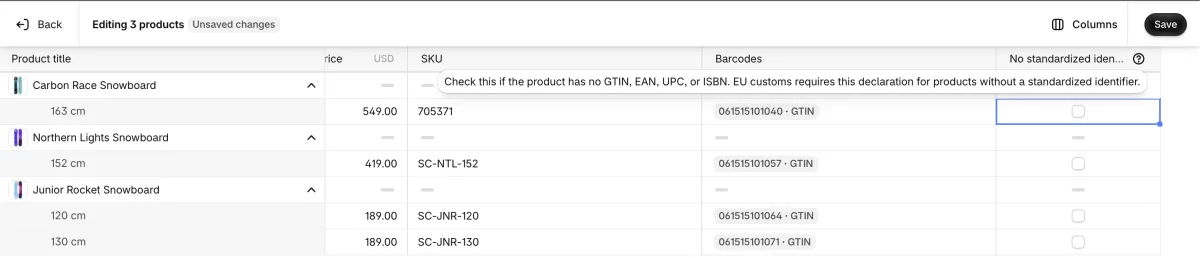
We tested this on 2 November 2026: a box ticked in the bulk editor showed as ticked on the variant's own page after saving.
Don't see the column? Use the steps above on each product or variant. The product CSV had no column for this when Shopify staff last replied on 22 October. Developers can also set it through the API with the compliance key Y081.
If Shopify won't let you buy a label
For an EU parcel bought through Shopify's labels, an item worth €150 or less that has no standardized identifier and no declaration blocks the label until you fix it. On the label page, click Edit customs declaration and enter the identifiers. For an item linked to a product, they save back to that product.
Buying labels somewhere else? Shopify says you must make sure the identifiers reach your carrier through your current method. Ask your carrier, broker or fulfillment partner how it reads them, because they don't all use the same fields, and a declaration made in Shopify may not reach them by itself. On 20 October, Shopify staff said the declaration reaching customs paperwork and carriers wasn't live yet. Shopify's 24 October changelog and help page now say identifiers go onto Shopify Shipping and Managed Markets labels and customs documents, so before you buy a label, open Edit customs declaration on the label page and check them. Labels cost money, and a voided unused label comes back as a credit within Shopify's 30-day limit.
Who is left out
- Goods already in the EU: the rule covers imports, so an EU store shipping from inside the EU isn't what it's aimed at.
- Certain goods: Shopify lists unprocessed agricultural and perishable goods in HS chapters 01 to 15, certain handmade and artisanal goods, and antiques, collectibles, works of art, stamps and coins.
You can't mark a product exempt yourself. Shopify works it out from the variant's HS code, so keep HS codes accurate.
These identifiers are separate from the EU's customs charges on low-value parcels, such as the €3 per item duty that began on 1 July 2026.
Good habits for your codes
- Give each variant its own code. A code shared by two sizes or colours doesn't identify either one. Find duplicates if you're not sure.
- Keep codes stable once you've started shipping, so don't overwrite them in bulk without a reason.
- Don't add your SKU as a barcode just for this. Shopify already uses it, and channels read a variant's first barcode, so a SKU there could be taken for the product's real barcode.
- If you resell someone else's product, ask your supplier for the maker's code rather than inventing one.
- Stick to letters, numbers, dashes and dots in manufacturer codes, because customs systems can differ on special characters.
Where SGT fits
SGT doesn't file customs declarations or set Shopify's barcode types. It can fill in missing SKUs across your store, generate GS1 barcodes from your own company prefix, and find duplicate codes. SGT saves barcodes as Custom, so a valid GS1 number from SGT can show Shopify's GTIN suggestion, and you can accept it in the bulk editor. Numbers from SGT's other barcode types are internal codes, so treat them as the section above explains.
Sources
Checked on 2 November 2026: Shopify's EU product identifiers guide, Shopify's barcode guide, the 24 October labels changelog, the 29 October GTIN suggestions changelog, Shopify staff replies on the developer forum about barcode types and bulk editing the declaration, and the European Commission's guidance page. These rules are new and may change. This guide isn't legal advice, so confirm your own case with your carrier or customs broker.
Frequently asked questions
Do all products need a GTIN to ship to the EU from Shopify?
No. Add a GTIN, EAN, UPC or ISBN if the product has one. If it truly has none, tick No EU standardized identifier on the variant, under Shipping and More details.
What is an NS-PID in Shopify?
The manufacturer's own code, such as a model, part or style number. Add it as a barcode with the NS-PID type. Without one, Shopify falls back to a standardized barcode, any other barcode, the SKU, then the variant ID.
Does a SKU count as an EU product identifier?
A SKU can cover the NS-PID through Shopify's fallback. It doesn't count as a standardized identifier, so you still need a real GTIN or the declaration.
Why can't I buy a shipping label for an EU order in Shopify?
An item worth €150 or less needs a standardized identifier or the declaration. On the label page, click Edit customs declaration and enter the identifiers.
Does Shopify treat my GS1 barcode as a GTIN automatically?
A registered GTIN you type in is set to the GTIN type automatically. A saved Custom barcode that's a valid GTIN gets a suggestion, and nothing changes unless you accept it. Shopify staff say it's already used as the S-PID either way, and that setting the type is safer.
Is one barcode on a variant enough for EU customs?
Yes, if it's a real GTIN, EAN, UPC or ISBN. Shopify uses it as the S-PID, and as the NS-PID if there's no NS-PID barcode. If it's an internal code or your SKU, it only covers the NS-PID, so you also need the declaration.
Can I declare no standardized identifier for many products at once?
Yes. In Shopify's bulk editor, click Columns, add No standardized identifier, tick the box on each variant that has no GTIN, EAN, UPC or ISBN, and click Save.
Do I need to buy GS1 barcodes for EU customs?
Not for this rule alone, if your product truly has no standardized identifier: Shopify lets you declare that. A retailer or marketplace may still ask for a GTIN.