 SGT Apps
Set it up
- In SGT, open AutoGen Setup, the Auto Generate settings (paid plan).
- Turn on New products, and New variants if you want it.
- Choose SKU, Barcode or Both, and your format.
- Save with Shopify's save bar at the top, then create a test product.
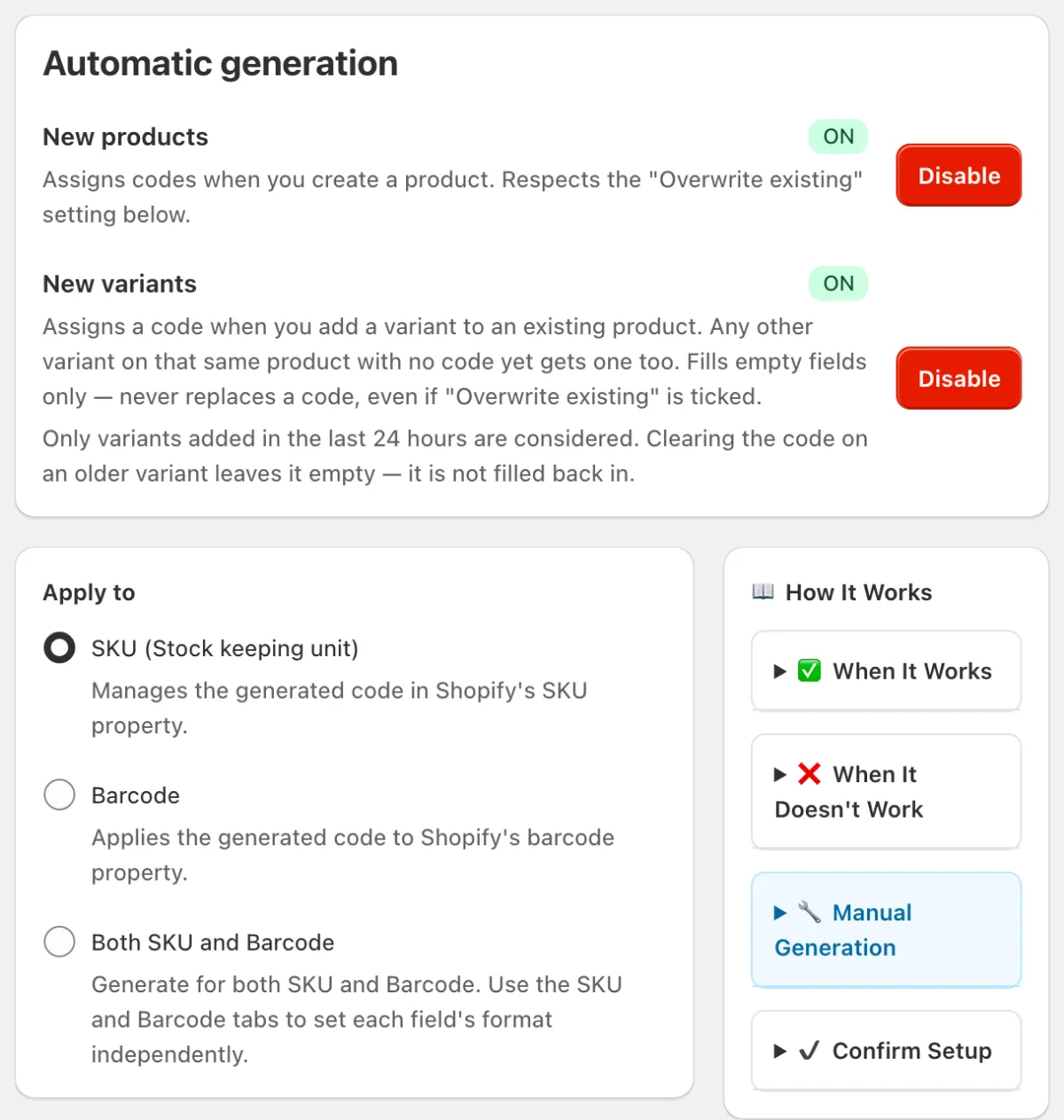
What each switch does
| Switch | Runs when | Existing codes |
|---|---|---|
| New products | You create a product | Stay, unless you tick Overwrite existing |
| New variants | You add a variant to a product | Always stay. Empty fields on variants added in the last 24 hours get filled |
When nothing happens
- Editing a product: changing a price, tag or description doesn't make codes.
- Clearing a code on a variant over 24 hours old: it stays empty on purpose, so a code you removed doesn't come back.
- Existing products: use Manual Generation for those.
Adding products on a phone or tablet
The Shopify app creates a product named "Untitled" as soon as you tap +. SGT waits until you tap Save, so the SKU comes from the real name. Codes appear a few seconds after that.
Using Shopify? SGT is our app for this: see it on the Shopify App Store (free plan, 4.8 from 53 reviews).
Works with imports and other apps
Products from a CSV import or another app get codes too. With many at once it takes a little longer. Metafield values must exist when the product is created, so for those use Manual Generation afterwards.
Choose the format first: see custom SKU patterns.
Prefer video? Watch how to create SKUs in Shopify. Automatic SKUs start at 3:48.
Frequently asked questions
How do I automatically add a SKU when a new variant is added to an existing product?
Turn on New variants in SGT's AutoGen Setup. The new variant gets its code in seconds. Other variants on that product added in the last 24 hours get one too, if they have no code. Codes already there are never replaced.
Can Shopify generate SKUs automatically by itself?
No. Shopify leaves the SKU and Barcode fields for you to fill. You need an app or a workflow to do it.
Will auto-generate overwrite the SKUs I already typed?
Not unless you tick Overwrite existing for new products. For new variants it never overwrites, even with that box ticked.
Can I auto-generate real UPC or EAN codes for new products?
Yes. Choose Barcode, then Valid GS1 barcode, and enter your company prefix. New products take the next number with the right check digit.